MowProHQ Blog/Scheduling
How to Run Spring Irrigation Startups Without Rebuilding the Spreadsheet
How to prepare and schedule a spring irrigation startup route from existing customer records without rebuilding last year's spreadsheet.

Spring scheduling is easier when customer, property, controller, and service history remain current throughout the year. Instead of rebuilding last season's spreadsheet, audit the existing records and schedule confirmed customers from them.
This guide explains how to audit the customer list before the thaw, group nearby properties, separate startups from repairs, and leave capacity for weather. Irrigation service software can support that workflow but is not a CAD design tool.
Why the spreadsheet dies every July
Irrigation is not a weekly mow. You live in two rushes: spring turn-on and fall blowout, with repairs in between. A spreadsheet is fine as a winter sketch. It is a liability as the operating system.
What actually kills the file:
- Someone sold the house and the row still says “Smith, green controller”
- Zone 4 was ugly in April, and the note lived in a tech’s camera roll
- You added mid-season repairs and never put them back on the sheet
- Two people edited two copies, then freeze hit and nobody reconciled
- Formulas that counted “done” broke the first time you sorted by zip
By spring, copied spreadsheets often contain stale customers, duplicate edits, and missing field notes. Move recurring access and system details into the property record when they are discovered rather than waiting for the next seasonal rush.
Audit the book in January, not in the driveway
The cheap work is off-season. The expensive work is discovering the list is wrong while the compressor is still in the shop and the phone is already ringing.
January pass, one property at a time:
- Still our customer? Sold, moved, or fired — archive. Do not leave ghosts on the wave.
- Same system? They added a zone, a drip line, or a new clock. That changes minutes and sometimes price.
- Access still true? Garage code, basement key, HOA gate, dog that cannot be in the yard.
- Last year’s punch list closed? A valve you quoted in May and never installed is not a startup. It is unfinished work.
- They still want us? A short yes/no beats assuming 180 households remember you.
Send one notice: window, price, what a startup includes, and that repairs are extra. Take yeses onto the board.
Worked example: 140 names, 18 lies
A shop has 140 rows from last November. Twelve sold. Four fired you after a missed blowout. Two combined lots. Eight never paid the last invoice and should not be on week one. That is not 140 starts. That is about 114, plus new leads who will call the first 70-degree day.
If you schedule 140 from the sheet, you will drive to dead addresses and skip the people who actually answered. The audit is the schedule.
Schedule the season in geographic groups
A spring irrigation startup is a seasonal product. Cluster it.
Density days: west side Monday, in-town Tuesday, the HOA Wednesday. Do not bounce across the county because someone texted first.
Windows, not fake Tuesdays: “Week of the 17th” beats “Tuesday at 9” you cannot keep when Monday’s manifold leaks. Publish the window. Move clusters when freeze returns, not random favors.
Recovery capacity: leave room for frost, access failures, equipment issues, and unexpected diagnostics. A schedule filled to the theoretical maximum will not survive normal delays.
| Day type | What belongs on it | What does not |
|---|---|---|
| Dense startup day | Known residential clocks, last year’s notes | First-year systems you have never seen |
| Mixed day | Starts plus quoted repairs you already sold | Driveway “while you’re here” valves |
| Ugly / commercial | Manifolds, locked rooms, long walks | Twelve easy starts stuffed after |
| Weather recovery | The cluster you skipped | Brand-new leads from the other side of town |
How you price the visit should already be on the job when it hits the calendar. Do not invent the startup fee at the controller.
Capacity math for March
Pick numbers you will not inflate because last April you “got them all” by invoicing in May. Count honest starts per tech (not a drought year), minutes for the leak that becomes a quote, freeze mornings, and a radius smaller than your ego.
| Input | Example | Notes |
|---|---|---|
| Field hours / tech / day | 8 | Includes parts-store runs if those are real |
| Clean residential startup | 40 min on site + 8 min travel | Known controller, last year’s photo |
| First-year or ugly system | 70–90 min | Find the clock, map the ugly zone |
| Freeze mornings per month | 4–8 | Market-specific |
Illustrative day:
| Math | Result |
|---|---|
| 8 hours × 60 | 480 minutes |
| Less fuel / parts / a callback | ~400 minutes of paying work |
| 400 / 48 min economic time | ~8 clean starts, or ~5 if two are ugly |
| Sell 14 starts plus “we’ll look at the valve” | The lie |
Measure capacity using completed service, documentation, travel, and billing time—not only the number of addresses visited. Use a calendar the team can follow.
Startup is not a repair, even on the same lawn
The fastest way to wreck a wave is to treat every broken head as included.
Startup (the product): water on, zones run, obvious breaks flagged, controller schedule set to a sane spring program, customer told what failed.
Repair (a different product): replace the head, rebuild the valve, chase a wire, swap a clock. Quote it from the lawn, then schedule the yes. Do not “just get it while the trench is open” unless you already sold that line.
| If you mix them | What happens |
|---|---|
| Startup priced as “we’ll fix whatever” | You donate March |
| Valve stuffed into a 40-minute slot | The next four houses slip |
| Punch list only in a text | Next year’s tech starts blank |
| “We’ll catch the head on blowout” | You will not |
Train the truck: photo the failure, write the estimate, keep moving. The board is for starts you already sold. Repairs that are not approved do not get to steal the cluster.
After heads are live, the mow crew still needs a flag habit on low or new heads. That policy lives in irrigation flags and sprinkler damage. Same property can hold mowing and irrigation. The startup visit is when you write “west row sits low — flag before first mow,” not a new department.
Controller access is the hidden stop
A startup you cannot turn on is not a startup. It is a wasted slot and an awkward text.
Put access on the property before the wave:
- Where the controller is (garage east wall, basement mechanical, HOA closet)
- How you get in (code, lockbox, tenant, office hours)
- Who must be home
- Dog / alarm / gate
- Last year’s photo of the clock and the ugly valve box
If the second tech cannot find the clock from the note, the note is a paragraph of history. Cut it down. “Garage, left of freezer, Hunter Pro-C, zone 4 mists” is a job. “Kind of a pain, call if you can’t get in” is a phone tree.
Commercial and HOA sites often need a work order or a two-hour window. Those are not Tuesday filler. They are their own day-shape. Do not park twelve residential starts after a locked pump room.
Communication that cuts panic calls
People call when they do not believe the window. Give them a window you are allowed to miss for frost.
Late winter (email, plus a short text if that is already how you reach them):
- Start window, not a fake Tuesday
- What a startup includes
- Repairs quoted separate
- Access reminder: controller, dogs, gate
- How the invoice arrives
When a freeze returns: one update, move the cluster, same logic. Do not rebuild 40 custom novels. The official record is the job on the board.
When they are not ready: later window, still on the book. “We’ll try to squeeze you Thursday” is how Thursday dies. “See you Tuesday” in January becomes an angry Tuesday. A week-of window does not.
Crews should not invent new ETAs at the manifold. If the board says Thursday, Thursday is the story until you change the board.
In MowProHQ
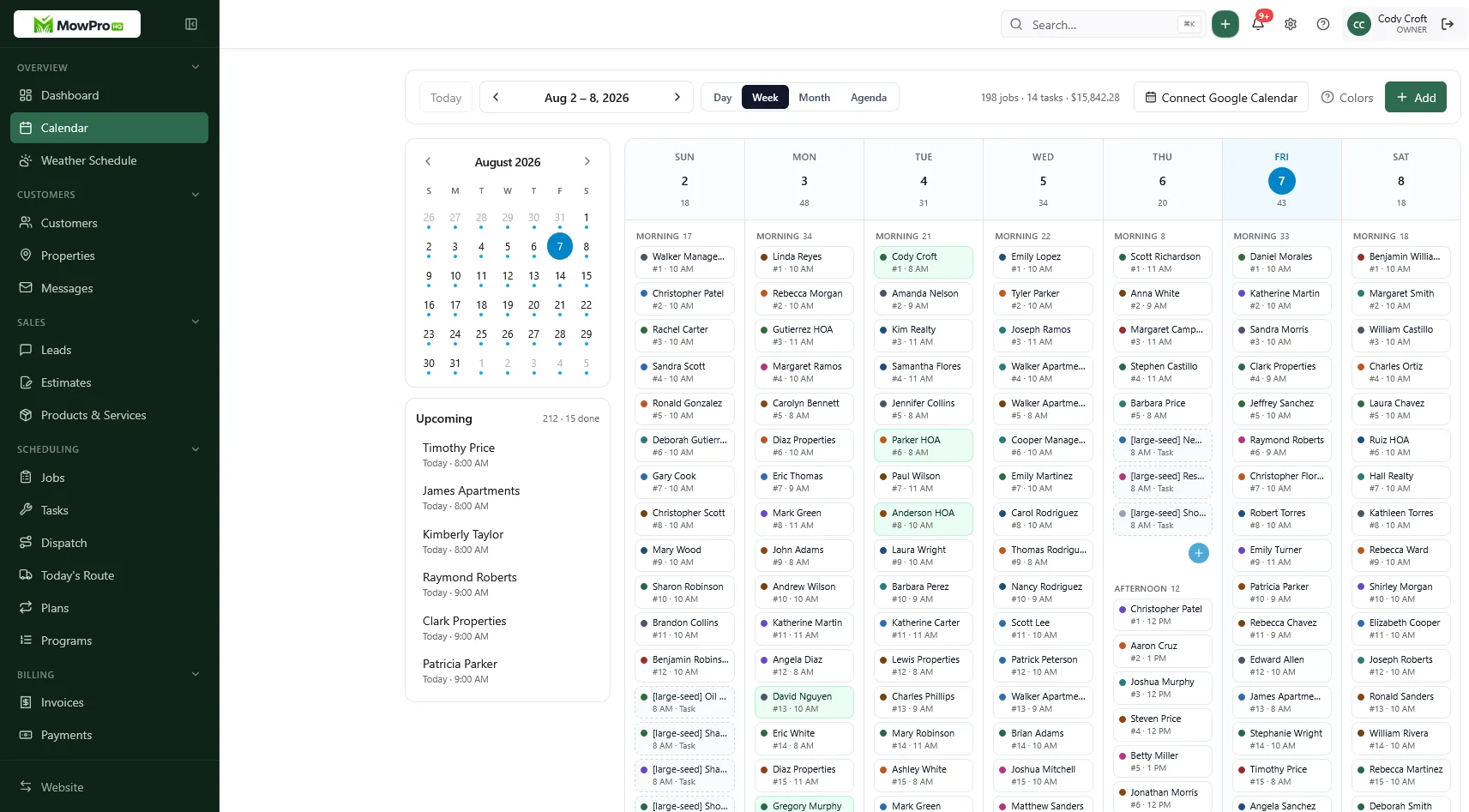
A pre-flight checklist (two weeks out)
- Active irrigation customers on properties, ghosts archived
- Controller location and access on the note
- Last year’s photos attached, not in a personal camera roll
- Startup product priced and named (not “service”)
- Repair menu ready so a valve is not a driveway guess
- Density days on the calendar, recovery air left
- Notice sent: window, include/exclude, how to say yes
- Dual Regular vs Cash on the quote so March card volume is not a surprise
- Who is allowed to add a new start to a packed day (probably only you)
If you also mow those yards, confirm the property is one record. Two tools for one address is how the irrigation note never reaches the mower. Stop selling same-week starts 25 minutes off the cluster, “startup includes whatever we find,” and verbal yeses with no job on the board. Saying no is a scheduling feature.
How MowProHQ keeps March off the dead sheet
MowProHQ keeps the customer, property, startup job, quote, and invoice connected so the spring schedule can begin from the same records used for prior service. Store controller locations, problem zones, access, and photos on the property.
Compare current plans and pricing or create an account to test the seasonal scheduling workflow.
Frequently asked questions
- How do I schedule spring irrigation startups without rebuilding a spreadsheet?
- Keep customers, properties, and controller notes in a system that persists between seasons. Before spring, archive sold properties, update changed systems and access, confirm who wants service, and schedule nearby properties in realistic daily groups.
- When should I start booking irrigation startups?
- Base the service window on local freeze risk rather than the first warm day. Send a late-winter notice, schedule confirmed customers, and leave room for weather delays.
- Should a spring irrigation startup include repairs?
- A startup should cover turn-on, inspection, controller setup, and a punch list. Broken heads, failed valves, wiring, and controller replacement should be quoted and scheduled as repairs unless the package explicitly includes them.
- How many irrigation startups can a tech run in a day?
- Capacity depends on travel, controller access, system size, condition, and whether it is a first visit. Use actual job times from prior seasons and leave room for documentation, customer questions, and repair estimates.
- What do I do with last year’s irrigation spreadsheet?
- Use it as an import and audit checklist, then preserve it as an archive. Move active customers, properties, prices, and service notes into records that can be scheduled and updated throughout the year.
- How should I handle customers who are not ready for startup?
- Assign them a later service window rather than leaving them as an uncertain stop on a full day. Keep the reason and follow-up date on the property so they remain visible.
- Can the same property hold mowing and irrigation startup?
- Yes. Keep service-specific mowing and irrigation notes attached to the same address. This allows the mowing crew to see flagged or low heads identified during startup.