Solutions/Window cleaning
Window cleaning software
The next tech should already know the door code
Window routes look simple until someone skips a pane, the code changes, or a storefront pays net 15. MowProHQ keeps those details on the stop so the route still looks professional when you are not the one on it.
What is window cleaning software?
MowProHQ is window cleaning software for residential and commercial routes. You get repeat stops, gate codes and pane notes, quotes, crew schedules, invoices, and payment links. One-time jobs and recurring storefronts live on the same customers.
The second tech does not know which panes were skipped, which door code changed, or which storefront pays net 15. That is not a calendar problem. It is a property-record problem, and customers feel it.
- Residential
- + commercial on one book
- $0
- to start with two seats
- $39
- Growth when the crew needs dispatch
You already have window cleaning customers. Stop running them from your phone.
- Recurring storefront routes
- Residential window cleaning
- Small crews balancing route work and one-off jobs
What you can stop using
- A spreadsheet of storefront days
- Door codes in a private chat
- Paper invoices left on a counter
- A booking site that does not know last month's visit
How a window cleaning company actually gets through the week
- 1
Build routes around properties, not a list of names
Homes, storefronts, and multi-site accounts each get a record with access notes and visit history.
- 2
Keep the details the next tech needs
Gate codes, pane notes, ladders vs water-fed, and customer preferences stay attached to the stop.
- 3
Quote one-offs without breaking the route
An interior add-on or a construction clean sits on the same customer, then on the calendar when approved.
- 4
Invoice when the glass is still drying
Send a payment link before you leave the lot. Recurring commercial accounts can bill on a plan.
What actually moves a window cleaning route
Keep recurring routes tight
Plan repeat stops, group nearby properties, and keep the week visible to the office and crew.
Store access and service details
Keep gate codes, pane notes, customer preferences, and visit history tied to the property.
Send clean quotes and invoices
Quote the job, schedule approved work, and send a payment link when the glass is clean.
Why shops pick this
Repeat stops only work if the details travel with the crew
Window cleaning is a natural fit because you already live on routes, access notes, reminders, and fast payment. Put that on the property so the next visit does not start from scratch. Start free and keep the route tight. Read window cleaning software for small crews.
Frequently asked questions
- Can I run both residential and commercial window cleaning?
- Yes. Use customers and properties for homes, storefronts, offices, and multi-site accounts, then schedule and invoice the work from the same system.
- What is the best window cleaning software for small crews?
- Software that treats the property as the unit of work: access notes, repeat visits, quotes, and invoices. MowProHQ is built for that, with a free plan for two people so a small crew can start without a monthly bill.
- Does MowProHQ handle one-time jobs?
- Yes. You can quote and schedule one-time jobs, while recurring plans handle repeat routes.
- How much does window cleaning software cost?
- MowProHQ is free to start. Growth is $39/mo for unlimited seats, dispatch, GPS, timeclock, and a live website. Pro is $89/mo.
- Can storefront accounts pay online?
- Yes. Send invoices and payment links. Recurring commercial stops can be billed after completed visits.
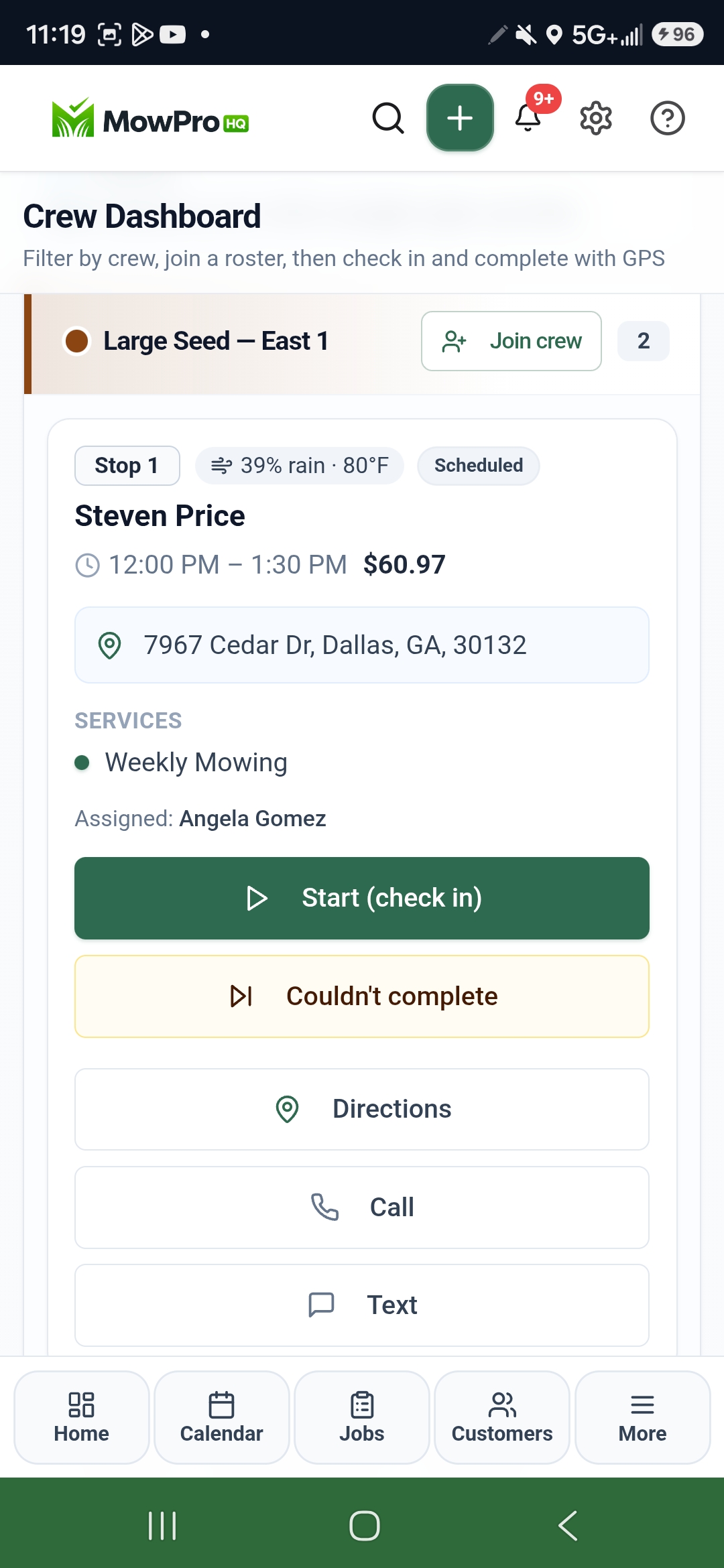
- Does the crew app show today's window stops?
- Yes. The free iPhone and Android apps show the day's work, let techs complete jobs, and attach photos.

Hand the window route to the next tech without a briefing
Start free with properties, notes, quotes, and invoices. Add dispatch and a live website when the second tech needs today's list on a phone.