
MowProHQ Blog/Buying Guide
Jobber Alternatives for Lawn Care Companies
How lawn care companies can compare Jobber alternatives for recurring routes, property records, estimating, team access, and total cost.

Jobber is a broad field-service platform designed for multiple trades. That breadth may suit a mixed-service company, while a lawn-focused operation may prioritize recurring routes, property-specific instructions, weather moves, and seasonal staffing.
This guide is a decision framework, not a recommendation to leave. Review MowProHQ versus Jobber, verify current provider documentation, and use the switching lawn care software guide before migrating.
Consider the advantages of a broad platform
- One login for mixed trades
- A mature client-facing hub
- Scheduling and invoicing that offices already know
- A large implementation and training market
If lawn, cleaning, and handyman services share one office, a broad platform may reduce duplicate systems. Still test lawn-specific workflows such as lot-size quoting, first-cut pricing, and chemical programs.
Test the lawn-specific workflow
| Need | Trial scenario |
|---|---|
| Weekly and biweekly work | Change cadence, pause, skip, and resume |
| Property notes | Confirm field visibility and history |
| Lot-size or map estimates | Verify measurements and preserve assumptions |
| First cut | Quote it separately from recurring maintenance |
| Route density | Review sequence, travel, and service area |
| Team access | Add seasonal users with individual permissions |
| Billing | Carry accepted scope through completion and invoice |
If essential route or property details remain in a separate spreadsheet, include that duplicate work in the comparison.

When to stay on Jobber
Stay if:
- Multiple trades share the account and the office is standardized
- The current system already handles the lawn workflow reliably
- Total cost, including users, add-ons, and payments, remains reasonable
Do not switch based only on a category label. Document the current problems, test the same week in an alternative, and compare measurable results.
When a Jobber alternative is the better tool
Look elsewhere if most of this is true:
- You are a mowing / outdoor company, not a multi-trade shop
- Seat or plan cost jumps every time you hire for May
- Property measurements, first cuts, and add-ons require duplicate records
- Data exports or integrations do not meet the company’s needs
- A trial shows a better workflow at a sustainable total cost
Score vendors with the buyer’s checklist and review common software mistakes.
Worked example: two-truck mow shop
- 140 recurring stops, 2 helpers in peak
- Jobber (illustrative): paid plan + extra users + processing
- Current problems: field access, estimates stored in notes, and inconsistent first-cut pricing
- Alternative test: import a representative sample, simulate a weather move, and preview an invoice
Compare setup time, crew questions, route changes, invoice accuracy, exports, and total cost. Stay with the current system if the alternative does not produce enough measurable benefit.
Migrate without disrupting the season
- Export customers, properties, open invoices, active plans
- Clean data and exclude obsolete one-time records where appropriate
- Test one route without sending duplicate customer messages or invoices
- Cut over during a lower-risk period with a rollback plan
- Retain records and appropriate read-only access as required
See switching lawn care software for reconciliation, retention, security, and cutover details.
In MowProHQ
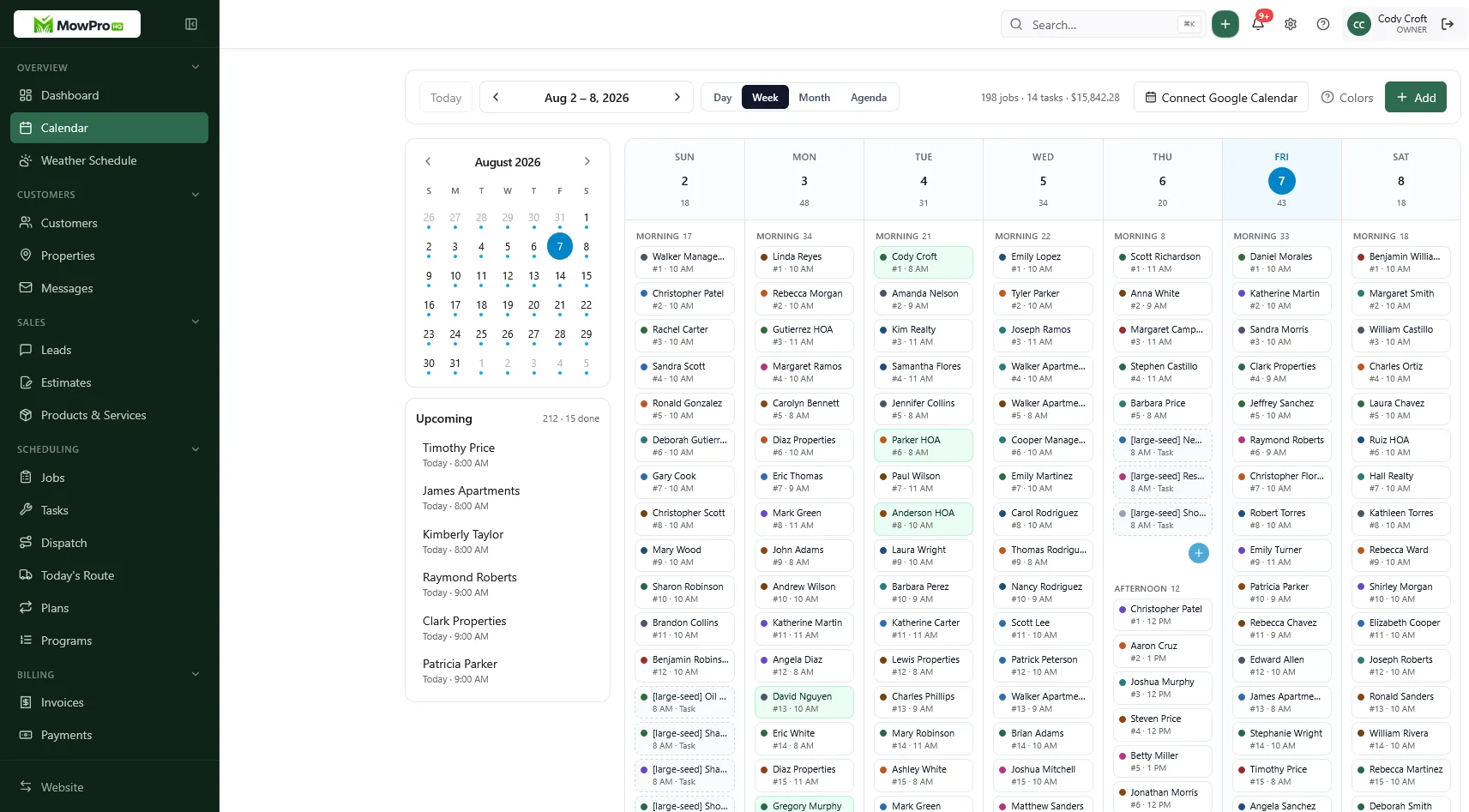
What “good enough” looks like after you leave
An alternative is working when field users can find assignments and notes, weather changes are manageable, invoices match completed scope, and records no longer require duplicate entry. If Jobber already meets those needs, staying may be the better decision.
Test one route and invoice policy first. Reconcile the result, then migrate the next group only after the process is stable.
How MowProHQ fits as a Jobber alternative
MowProHQ focuses on customers, properties, recurring lawn schedules, estimates, jobs, invoices, and field operations. Confirm current feature availability, import options, user access, payment costs, and support before switching.
See MowProHQ versus Jobber, review current pricing, or create an account and run a limited trial. Do not migrate the full customer list until the workflow and financial records reconcile.
Keep one system responsible for each live property during the trial, preserve required records, and avoid changing prices during the same migration.
Frequently asked questions
- What is the best Jobber alternative for a lawn care company?
- The best alternative depends on the company. Compare recurring schedules, weather changes, customer and property records, estimates, mobile field use, invoicing, exports, support, integrations, and total cost at peak staffing.
- Is Jobber good for lawn care?
- Jobber is a broad field-service platform, and lawn care companies use it successfully. Test its current recurring-work, quoting, routing, property-note, treatment, team-access, and billing workflows against your operation.
- Why do lawn care companies leave Jobber?
- Common reasons to compare alternatives include total plan and user cost, field usability, recurring-route workflow, quoting requirements, or paying for features the company does not use. A switch also requires data and financial reconciliation.
- Can I switch from Jobber mid-season?
- Yes, but use a staged migration. Test one route, assign one source of truth for live work, reconcile active customers and balances, and avoid changing prices or billing policies during the same cutover.
- Is free lawn care software a real Jobber alternative?
- It can be if the free plan supports the required workflow and volume. Verify limits on users, customers, recurring jobs, estimates, invoices, exports, messaging, storage, payments, and support.
- Does MowProHQ replace Jobber for a mowing-only company?
- It may replace Jobber for a lawn-focused company if a representative trial confirms the required workflow and data migration. Multi-trade companies should also evaluate the cost and risk of splitting operations across systems.
- Where can I see a side-by-side of MowProHQ and Jobber?
- Use the MowProHQ versus Jobber comparison page, then verify current features, prices, and terms directly with both providers. Pair the comparison with the buyer’s checklist and switching guide.


