
MowProHQ Blog/Buying Guide
Best Lawn Care Software for Solo Operators
How solo lawn care operators can compare software for recurring schedules, property notes, quotes, invoicing, and future hiring.
A solo operator handles sales, scheduling, fieldwork, and billing. Software should reduce that administrative work without requiring an office manager, while still allowing another user to join later.
This guide focuses on the essential solo workflow. Pair it with how to run a mowing service, free versus paid software, and the guide to software seat fees.
Start with four essential jobs
- Who — customer and property
- When — recurring plan and current schedule
- What — scope and price on a quote
- Paid — invoice the same day
Ask the vendor to demonstrate these four jobs first. Advanced mapping does not compensate for a difficult daily workflow.
| Need now | Need later |
|---|---|
| Properties + notes | Multi-crew dispatch |
| Weekly / biweekly plans | Route optimization |
| Quotes → jobs | GPS history |
| Same-day invoices | Chemical programs |
| Dual Regular vs Cash | Review automation |

Features that can usually wait
- Enterprise permissions
- Five marketing add-ons
- Integrations you will not connect this month
- Automation without a defined use case
The guide to lawn care software mistakes covers other ways to avoid paying for features too early.
Spreadsheet vs software when you are one person
A calendar and spreadsheet may be enough while the schedule and records remain accurate. Consider a connected system when weather changes, quotes, property notes, or invoices regularly slip.
How to trial as a solo
Follow the trial script with a representative set of your own stops, one quote, one invoice, and one weather move. If the workflow adds unnecessary steps, continue comparing products. If it works, migrate active customers first.
In MowProHQ
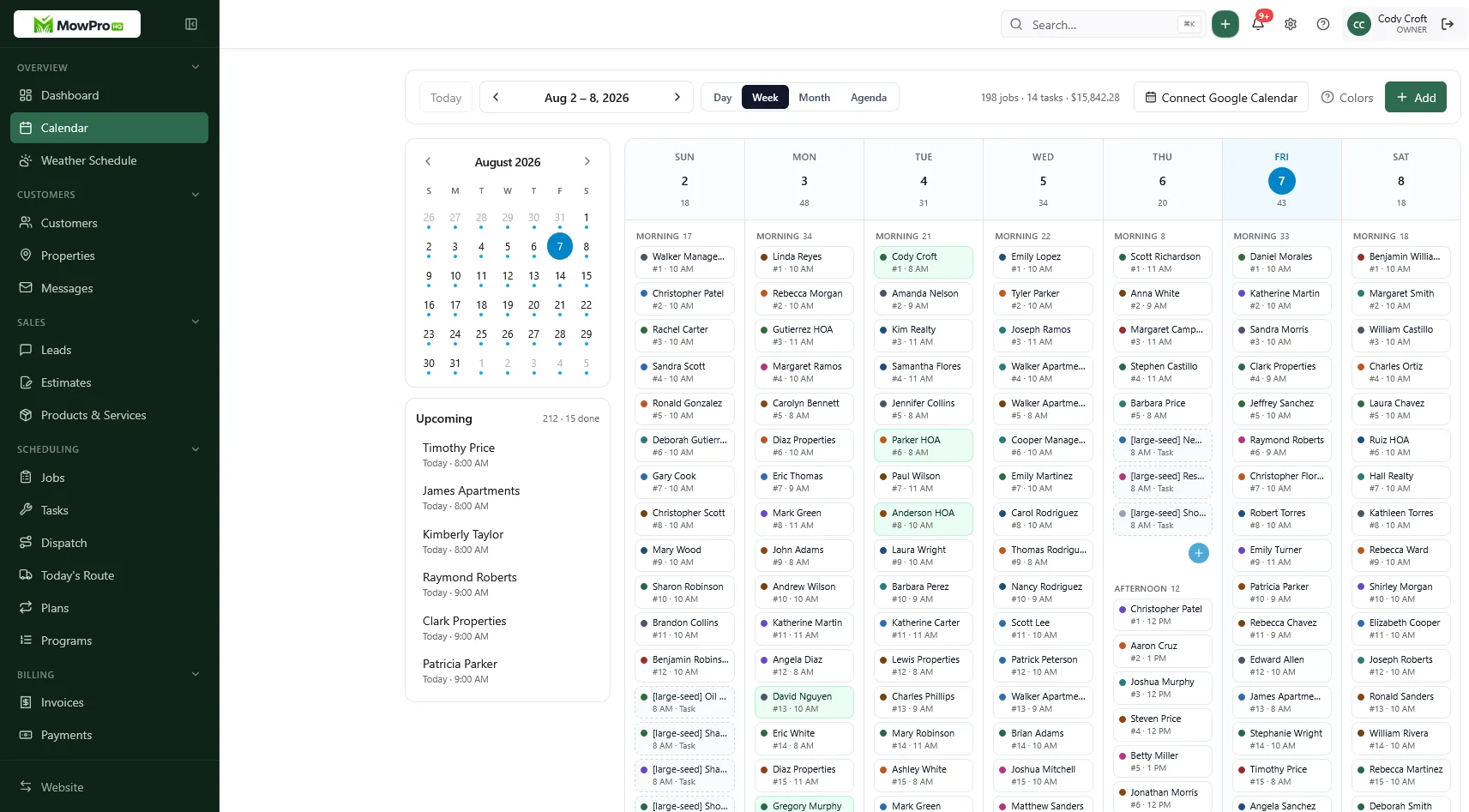
A practical solo week
Before the week: Review upcoming visits instead of rebuilding the calendar.
During the route: Open property notes from the phone, record completion after each stop, and invoice immediately or at a fixed billing time.
After weather changes: Move the affected group of stops and notify customers consistently.
When quoting: Prepare the quote in the same system that will later hold the job and invoice.
The workflow should be understandable enough for a temporary helper or office backup to follow. Before hiring, review software for a small crew and confirm the cost of individual user access.
Prioritize the daily workflow
GPS and advanced route optimization can wait until they solve a real problem. Accurate quotes, schedules, completion records, and invoices are useful from the first day. The hourly rate calculator also depends on complete revenue and time records.
What a solo Monday should look like in the app
The daily view should show the first address, service package, and property notes without requiring several other apps.
Send invoices after completion or at a fixed route checkpoint. Delayed billing makes it easier to omit extras such as bagging or hauling.
When a lead texts, do not prepare a quote while driving. Use saved service packages and verify property details before sending a written price.
Review invoice aging, quote acceptance, route time, and collected revenue at least monthly. If administrative work is routinely postponed, the current process is no longer adequate.
How MowProHQ fits one truck
MowProHQ connects customer and property records, recurring schedules, quotes, jobs, and invoices. Compare current plan details for user access, website features, dispatch, GPS, chemical tracking, and payment processing.
Review pricing, then create an account and test a real week before migrating the full customer list.
Good solo software should reduce administrative time and make the next stop clear. Keep the evaluation centered on properties, recurring plans, quotes, completions, and invoices until another worker creates a need for more.
Frequently asked questions
- What is the best lawn care software for a solo operator?
- Choose a tool that is easy to use every day and connects customers, properties, recurring schedules, quotes, job status, and invoices. Add advanced routing or crew features only when they solve a current problem.
- Does a one-truck lawn company need software?
- A one-truck company benefits from software when recurring visits, notes, estimates, and invoices can no longer be tracked reliably in a notebook or separate apps. The right time depends on complexity, not a fixed customer count.
- Should solo operators pay for dispatch and GPS?
- Usually not at first. Prioritize scheduling, property notes, quotes, and invoicing. Add dispatch or GPS when another worker needs assignments or location information would solve a recurring operational problem.
- Is free lawn care software enough when I work alone?
- It can be. Check current limits on customers, recurring jobs, users, quotes, invoices, exports, messaging, storage, and payments. Compare the total cost if you later add a helper.
- What features do solo lawn care owners overbuy?
- Solo operators may overbuy route optimization, fleet tracking, complex permissions, or integrations they will not configure. Start with the daily workflow and add features when the need is measurable.
- When should a solo operator upgrade software?
- Upgrade when a paid feature solves a recurring bottleneck, such as team access, weather rescheduling, lead capture, or payment cost. Use current pricing and actual volume to evaluate the decision.
- Can I start free and add a helper later?
- Yes. Before choosing a product, compare its user limits and the cost of adding workers. Confirm that each helper can receive an individual account without forcing an unexpected plan change.


