
MowProHQ Blog/Buying Guide
Best Lawn Care Software for a 2–4 Person Crew
How to compare lawn care software for a 2–4 person crew, including dispatch, property notes, individual access, time tracking, and invoicing.

Moving from a solo route to a small crew changes what software needs to do. A personal calendar is no longer enough; workers need shared assignments, current property notes, job status, and a clear process for weather changes and completed work.
This guide focuses on teams of two to four people. Pair it with software for solo operators, crew scheduling, software seat fees, and scaling without losing quality.
What changes at two lists
| Solo | 2–4 people |
|---|---|
| You know the notes | Notes must be on the property |
| One sequence | Two sequences, one rain policy |
| Invoice from memory | Invoice from recorded completions |
| One login | Logins that do not share a password |
Property notes and job checklists become more important when the owner is not at every stop. GPS may help when location questions and reassignments occur regularly.
Buy for the current workflow
Need now
- Shared day list
- Assignment
- Completions that can invoice
- Affordable user access at peak seasonal staffing
Need soon
- Dispatch board and weather
- Reliable time tracking
- Basic route visibility and density reporting
Need later
- Optimization modules
- Chemical programs if you sell them
- Review automation
Avoid buying advanced fleet tools before the shared schedule is reliable. At the same time, do not continue using a personal calendar after multiple workers need independent assignments. Choose the features that let a crew lead handle a normal weather change without constant owner input.
Roll out the system in stages
- The owner tests one week with real jobs.
- A crew lead runs their list with the owner available for questions.
- Each additional worker receives an individual account.
- The team practices a weather reschedule.
Use a software trial script on actual stops. If you are replacing another system, follow the switching guide: prepare office data first, then train the crew.
In MowProHQ
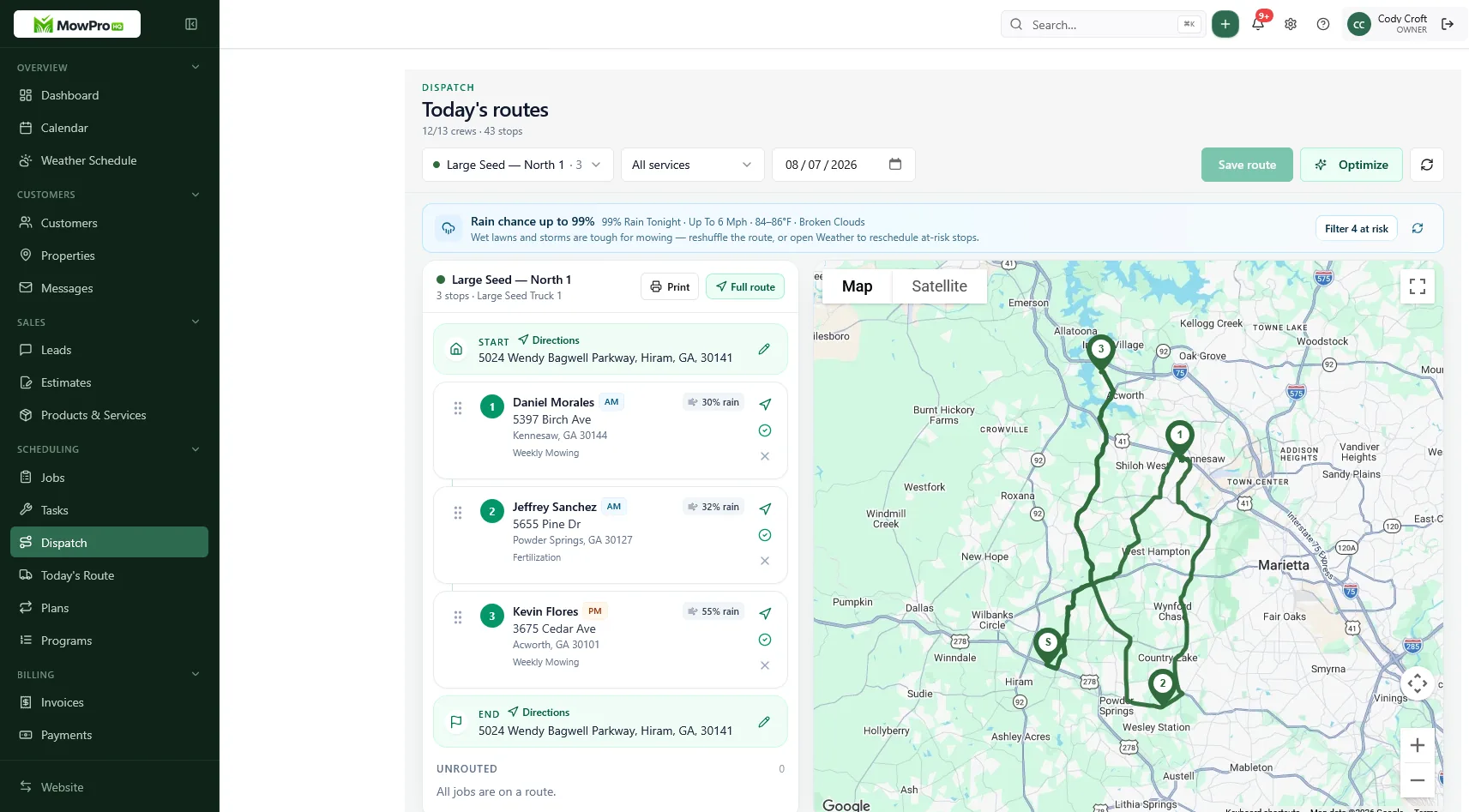
Two lists, one standard
Software cannot correct an undefined service scope. Establish package names, checklists, and visible property notes before adding route optimization.
Publish assignments before the workday when possible. If a lead repeatedly calls for routine stop information, review the board and notes. Add GPS when location data would solve a recurring dispatch problem.
Pay and the board
If you use production pay, accurate completion records may affect payroll. If you pay hourly, use a consistent time-tracking process. Follow applicable wage, overtime, recordkeeping, and location-tracking laws.
Compare software cost at peak staffing, not only current headcount. Review the seat-fee guide and avoid shared passwords.
A week-one checklist for the second truck
Day before they start: Add the correct package to each job, confirm gate and animal notes, attach the matching checklist, create their account, and explain how scope changes are approved and recorded.
Day one: Assign a familiar, representative list rather than the most difficult properties. Inspect a sample of completed stops and give specific feedback.
Day three: Practice moving several stops after a weather delay. Make sure everyone can find the revised assignments without rebuilding the route from texts.
Day five: Confirm that recorded completions provide the office with enough accurate information to prepare invoices without re-entering every job.
The system is working when routine information moves from the crew to the office without the owner relaying every detail.
How MowProHQ fits 2–4 people
MowProHQ connects customer and property records, schedules, quotes, invoices, and team operations. For a small crew, compare current plan details for user access, dispatch and routing, GPS, time tracking, and payment processing.
Review pricing, then create an account and test the system with one crew lead before moving every route.
Publish the assignments, give each worker an individual login, inspect a sample of work, and prepare invoices from recorded completions. Those steps are a better test than a long feature list.
Frequently asked questions
- What is the best lawn care software for a small crew?
- Look for a shared schedule with assignments, property notes, completion status, and a clear path from finished work to invoicing. Compare user limits and total cost at your expected seasonal headcount.
- When does a two-person lawn company need dispatch software?
- Dispatch software becomes useful when multiple workers need separate assignments and the owner is spending significant time answering route questions or reorganizing work after weather changes.
- Should every crew member have their own login?
- Yes. Individual accounts create clearer notes, time records, location history, and accountability. Compare per-user and flat-rate plans using the highest likely seasonal headcount.
- What features does a 2–4 person crew overbuy?
- Small crews may overbuy enterprise routing, multi-branch reporting, or specialized modules they do not use. They can also underbuy by choosing a tool without shared notes, assignments, or a practical invoicing workflow.
- Is free software enough for two trucks?
- It may be, depending on user limits and the features included. Verify whether the current free plan supports each worker, assignments, mobile access, completion records, exports, and the volume of work you expect.
- How do I roll out software to a small crew?
- Set up jobs, notes, assignments, and invoicing first. Test the workflow with one crew lead, correct the board, and then add the remaining workers with individual accounts and a short written process.
- What KPIs show the software is working for a small crew?
- Track planned versus completed stops, invoice delay, drive time between jobs, callbacks, and overtime. Compare those measures before and after rollout to determine whether the software is improving operations.


