MowProHQ Blog/Dispatch
GPS and Day-of Dispatch for Lawn Care Crews
A practical guide to lawn care GPS tracking, day-of dispatch, employee privacy, safer driving, and customer communication.
GPS can make day-of dispatch easier, but more location data is not automatically better dispatch. The useful question is narrower: what is the minimum information needed to route work, provide a reasonable arrival update, or document a work event?
For some lawn care companies, a job-start or job-complete event is enough. Others may have a legitimate need for company-vehicle location during scheduled hours. A solo operator with a dependable calendar may need neither. Start with the operational problem, then choose the least intrusive tool that addresses it.
What lawn care GPS can—and cannot—solve
Location or job-status data can support several practical workflows:
- Day-of reassignment. A dispatcher can identify a crew that has completed nearby work before moving an urgent stop.
- Customer updates. Recent job status can support a realistic arrival window without repeatedly calling the crew.
- Work-event records. A location attached to clock-in, job start, or completion may help resolve a factual question, but it should be reviewed with the full context.
- Company-vehicle operations. During authorized work hours, location may help coordinate breakdowns, recover equipment, or route a roadside response.
GPS does not prove productivity, intent, time theft, or misconduct on its own. Signals can be delayed or inaccurate, phones can lose service, and a map does not show traffic, fuel stops, customer conversations, equipment trouble, or approved breaks. Treat a missing or unusual point as a prompt to verify—not as a conclusion.
GPS also does not repair poor property notes or a route that crosses town unnecessarily. Improve route planning before adding another data stream.
Choose the minimum useful approach
| Approach | Potential use | Main caution |
|---|---|---|
| Job-status only | Crew marks start, completion, delay, or access issue | Depends on consistent updates |
| Event-based location | Location recorded at defined work events | Events and purpose must be clearly disclosed |
| Work-hours location | Dispatch view during scheduled work | Must reliably stop outside authorized hours |
| Company-vehicle location | Routing, breakdown response, or equipment recovery | Personal use and passenger privacy need clear rules |
| No location collection | Calendar, status updates, and dispatcher check-ins | May require more manual coordination |
Continuous phone tracking is a significant step beyond recording a few work events. Before adopting it, document why a less intrusive option is insufficient and review the legal, security, battery, and employee-relations implications.

Build employee location privacy into the rollout
Location data can reveal sensitive patterns, including where a person takes breaks, seeks medical care, worships, or spends time outside work. Handle it as sensitive workforce data rather than a casual dispatch feed.
Before collection begins:
- Define the purpose. List the specific uses, such as routing active work, responding to a breakdown, or recording an authorized job event.
- Limit collection. Choose the least precise data and shortest tracking window that meets those uses.
- Give advance written notice. Explain the data collected, source, timing, purpose, access, retention, sharing, and complaint process in plain language.
- Address consent where required. A policy acknowledgment is not always the same as legally valid consent. Requirements may differ for employees, contractors, unionized workers, personal phones, and company vehicles.
- Test the off switch. Confirm tracking stops after a shift, during approved off-duty periods, and when an employee uses a personal device outside the stated scope.
- Train managers. Location should support dispatch, not speculation about lawful breaks, protected activity, health, family matters, or other off-duty conduct.
Do not enable tracking by surprise. Give employees a chance to ask questions, explain how to report inaccurate data, and provide a practical alternative when a personal phone cannot or should not be used. If the job requires an app or device, check local rules on expense reimbursement and provide appropriate equipment where needed.
Pairing location with a crew timeclock can affect wage-and-hour records. Define when paid time begins, how travel and waiting time are handled, and how an employee corrects a missed or inaccurate event. GPS should not be used to make automatic pay deductions without verification and a lawful correction process.
A written policy should answer these questions
- What exact data is collected, and from which app, phone, or vehicle?
- Is collection event-based, work-hours only, or continuous?
- How can a worker tell when tracking is active?
- What operational purposes are allowed—and prohibited?
- Who can view raw data or reports?
- Is data shared with customers, insurers, vendors, or law enforcement, and under what process?
- How can an employee view relevant records, request a correction, or report a privacy concern?
- How long is data retained, and how is it securely deleted?
- What happens when service fails, a phone dies, or an event is missed?
- How are off-hours, breaks, personal vehicles, and personal-device use protected?
Apply the policy consistently, but keep room for disability accommodations, safety needs, protected leave, collective bargaining obligations, and local legal requirements.
Control access and retention
Collecting less data reduces both privacy risk and security exposure. Dispatchers may need current work status; they rarely need unlimited access to historical movement. Supervisors should see only what their role requires, and customer-facing staff usually need an arrival window—not a crew member’s exact location.
A practical data-governance plan includes:
- Role-based access and multifactor authentication
- A record of administrative access where the system supports it
- A short, written retention period tied to a real business or legal need
- Automatic deletion when the retention period ends
- A process for employee access and correction requests where required
- Vendor review covering security, data sale or advertising use, subprocessors, deletion, and breach notice
- A litigation-hold process that preserves only the records that must be kept
Avoid retaining location indefinitely “just in case.” Payroll, tax, insurance, employment, and litigation rules may require different records for different periods, and a location log may not be the official record you need. Have local counsel and your payroll or HR adviser align the schedule with the jurisdictions where people work.
Keep off-hours tracking off
Off-hours collection creates avoidable risk, especially on personal phones or vehicles that employees may use privately. Configure tracking around actual scheduled work and make the state visible to the worker. Test shift-end behavior after app updates and document who may authorize an exception.
If a company vehicle can be used personally, state whether vehicle location continues during personal use, why, and who can access it. Consider privacy mode, defined no-review periods, or another method that meets fleet needs without following personal activity. Never rely only on an employee remembering to change a hidden setting.
Emergency access should also be limited. Define what counts as an emergency, who may approve access, and how the access is documented afterward.
Day-of dispatch without distracted driving
The dispatcher—not the driver—should manage the screen. Set the expectation that crew members do not read, type, accept a reassignment, or troubleshoot an app while driving. Use automatic updates, a passenger, or a safe pull-over process.
When the day changes:
- Confirm the latest reliable job status. If data conflicts, contact the crew only when they are safely stopped.
- Protect neighborhood sequence instead of scattering individual stops across town.
- Check crew skills, equipment, promised windows, workload, and drive time before reassigning.
- Update the board first so everyone sees one plan.
- Send customers a realistic window and a single way to reply.
- Record approved add-on work before it begins.
| Trigger | Dispatch check | Safer default response |
|---|---|---|
| Crew is running late | Is the status current and is the remaining route still dense? | Adjust later windows or move a compact group of stops |
| Employee is absent | Which work needs a specific crew size or skill? | Reassign by capability, not proximity alone |
| Same-day request | Does it fit an existing route and workload? | Offer a window only after the crew safely confirms capacity |
| Equipment failure | Which crew has suitable equipment and room? | Move a route segment or reschedule; do not rush the driver |
| Weather cutoff | Which zone can move together? | Bulk-reschedule the area and notify customers |
The lawn care schedule remains the source of work still due. Location is one input, not an automatic assignment engine.
Example: an urgent commercial stop
A property manager requests service before an afternoon walkthrough. The dispatcher sees that one nearby crew has marked its prior job complete, checks the remaining workload and equipment, and sends a proposed assignment. The crew reviews it only after parking and confirms capacity. The dispatcher then gives the customer a broad, realistic window.
If status is stale or the crew does not respond safely, the dispatcher uses the schedule and calls at the next planned stop. Customer urgency does not justify distracted driving or an unrealistic promise.
Communicate with customers without exposing crews
Customers generally need to know whether service is still planned and what the updated window is. They do not need a worker’s live dot, personal phone number, break location, name, or travel history.
Useful messages are brief:
- “Your crew is still scheduled today. The updated arrival window is 1:00–3:00 p.m.”
- “Weather has delayed today’s route. We have moved your visit to Friday and will confirm if conditions change.”
- “Equipment trouble affected the route. We will send a new service window by 4:00 p.m.”
Describe windows as estimates unless you can reliably guarantee them. Obtain any permissions required before sending automated texts, honor opt-outs, and avoid putting sensitive property details into unsecured messages. The same notification habits used for weather reschedules work for breakdowns and staffing changes.
When a calendar is enough
A solo operator or small crew can often run well with:
- Routes published before the workday
- Property notes attached to the stop
- Clear ownership of the dispatch board
- Completion and exception updates before leaving the area
- A consistent process for weather and customer changes
If those habits are missing, GPS will display a disorganized day with greater precision. Strengthen crew scheduling and job checklists first.
Consider adding limited location data when reassignments are frequent, job status is routinely unclear, or a documented safety or fleet need cannot be met another way. Solo-to-crew scaling is usually a process and communication challenge before it becomes a tracking challenge.
Legal review is local, not one-size-fits-all
Employee monitoring, privacy, consent, notice, wage-and-hour, reimbursement, labor, biometric, wiretap, and data-protection rules vary by country, state or province, and sometimes city. Rules can also depend on whether the person is an employee or contractor, whether the device is personal or company-owned, and whether a collective bargaining agreement applies.
Before launch—or before materially changing the purpose, precision, or hours of collection—ask qualified local employment and privacy counsel to review:
- The notice and any consent language
- Personal-device and reimbursement practices
- Off-duty and company-vehicle use
- Retention, access, disclosure, and deletion
- Payroll or discipline workflows that use location data
- Union consultation or bargaining obligations
- Customer messaging and automated-text practices
This article is operational guidance, not legal advice. Multi-state employers should review every place where workers perform services, not only the company’s home address.
In MowProHQ
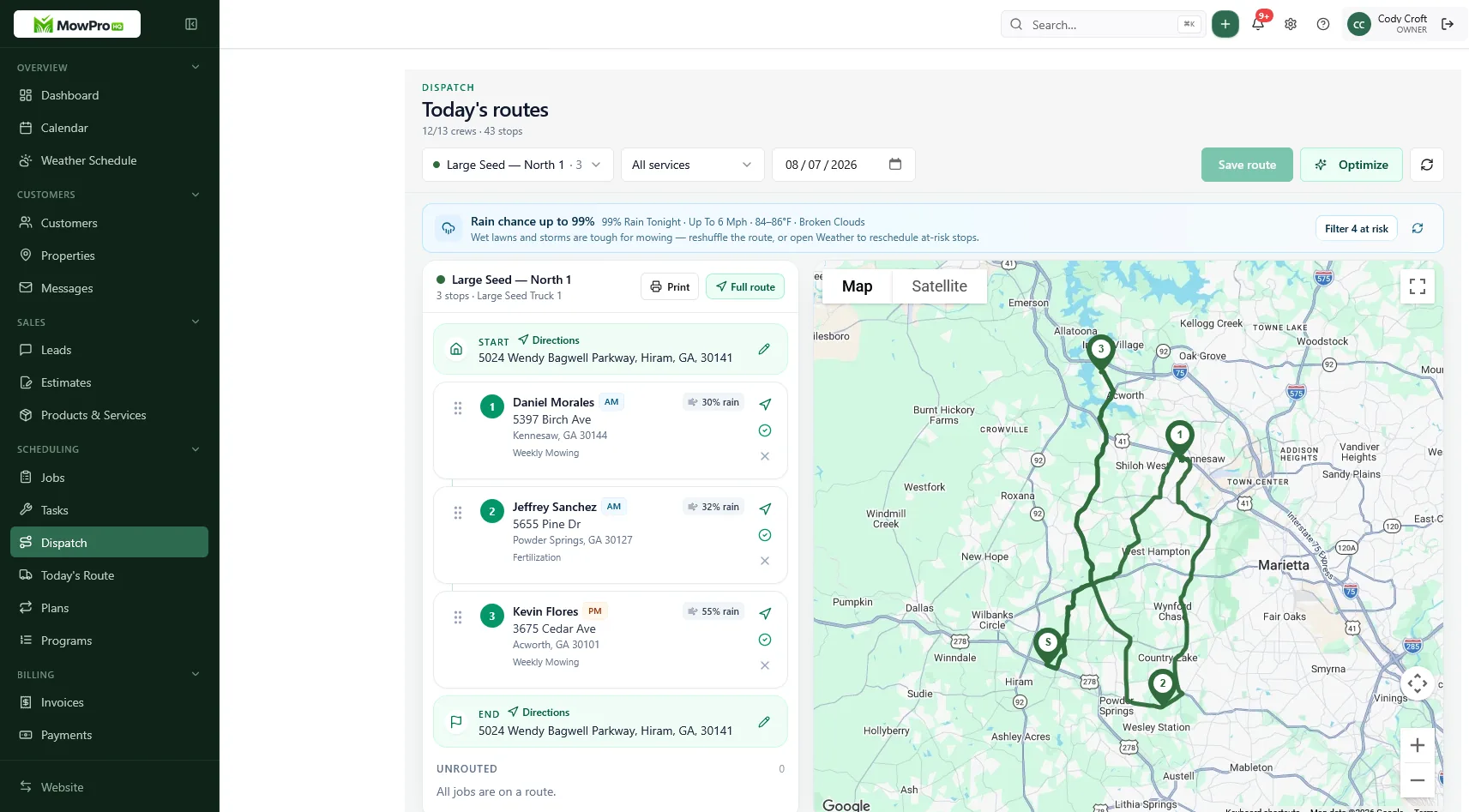
How MowProHQ supports day-of dispatch
MowProHQ brings customer, property, scheduling, and dispatch information into one workflow. Available capabilities and plan details can change, so review the current pricing page for the latest information.
When your routes and privacy policy are ready, you can sign up and configure the workflow around your actual business needs. Use only the location features you can justify, disclose, secure, and manage responsibly.
The best dispatch system reduces calls, protects drivers, gives customers useful updates, and respects the people doing the work.
Frequently asked questions
- Do I need GPS tracking for my lawn care crews?
- Not necessarily. GPS can help when several crews need day-of reassignments or customers regularly ask for arrival updates. A solo operator or small team with a reliable schedule, clear property notes, and consistent job-completion updates may not need location data.
- Does lawn care GPS require constant background tracking?
- No. Depending on the operational need, a business may use location only at defined work events, during scheduled work hours, or from a company vehicle. Choose the least intrusive approach that meets the stated purpose and confirm that it complies with applicable law.
- Should employees receive notice before GPS is enabled?
- Yes. Give workers clear written notice describing what is collected, when tracking starts and stops, why the business uses it, who can access it, how long it is kept, and how workers can raise a concern. Consent requirements vary by location, device ownership, and employment context, so obtain local legal guidance.
- How should a dispatcher respond when a crew falls behind?
- Confirm the schedule and latest reliable job status, protect neighborhood route density, move only the work that must move, and send affected customers a realistic updated window. Never ask a driver to read or answer messages while the vehicle is moving.
- Does GPS replace route planning software?
- No. Route planning decides which stops belong together and in what order. GPS or job-status events may help a dispatcher understand progress and recover from disruptions, but they cannot fix a poorly designed route.
- How long should employee location data be retained?
- Keep it only as long as needed for a documented business or legal purpose. Set a written deletion schedule, restrict access, and preserve specific records longer only when required for payroll, a claim, litigation hold, or another lawful reason confirmed with local counsel.