MowProHQ Blog/Scheduling
Lawn Care Scheduling Software: What You Actually Need
How to evaluate lawn care scheduling software for recurring jobs, weather changes, crew access, mobile work, timekeeping, exports, privacy, and security.
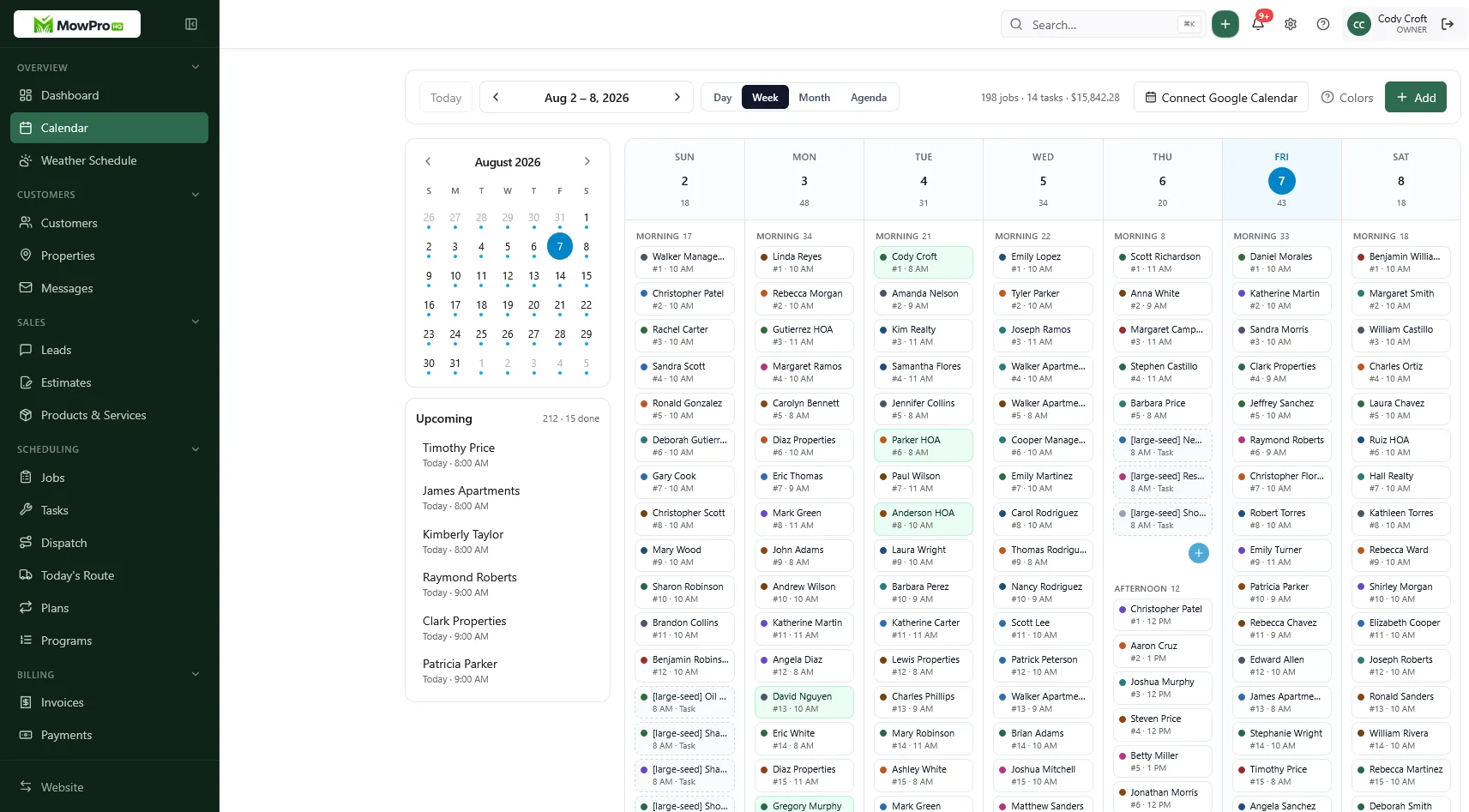
Lawn care scheduling software should give the office and field team the same answer to a basic question: what work is due, where, and who is responsible for it? The harder test is whether that answer remains reliable after rain, a breakdown, a customer pause, or a last-minute add-on.
This guide explains how to evaluate a lawn care calendar for recurring mowing, crew scheduling, route changes, mobile use, timekeeping, privacy, and security. The goal is not to collect the most features. It is to choose a system your team can keep accurate.
What lawn care scheduling software should manage
A useful system connects four records:
- Customer: contact and billing information.
- Property: service address, access instructions, hazards, and site-specific notes.
- Job: service, date or time window, assigned crew, status, and price or billing reference.
- Recurring plan: frequency, season, start and end rules, and the policy for skips or delays.
Keeping these records connected avoids ambiguity when one customer has several properties or one property receives several services. The field team should see the property information needed for the visit without gaining unnecessary access to billing, exports, or account settings.
For related setup guidance, see lawn care CRM for customers and properties and property notes that crews actually read.
Recurring jobs need explicit rules
A recurring mowing schedule is more than copied appointments. Before entering a service, decide:
- Frequency: weekly, every other week, monthly, or a custom interval
- Active season and any planned end date
- Preferred day or service window
- Crew, route, or service-area assignment
- Included work, such as mow, edge, trim, and blow
- What a pause, skip, cancellation, or weather delay does to the next occurrence
The last point matters. After a Wednesday visit moves to Friday, one business may keep future visits on Wednesdays while another may restart the interval from Friday. Neither rule fits every operation, but the software should make the result visible before someone changes the series.
Use a test account to try the full lifecycle: create a biweekly job, edit one occurrence, pause it, skip a visit, resume it, and end the service. Confirm that past visits remain intact and future work changes only when intended. For packaging and customer communication, see recurring mowing plans that stick.
Weather changes without losing the route
Weather rescheduling is where a lawn care calendar is most likely to fail. Moving work should not erase the original date, duplicate the next visit, or make completed jobs billable twice.
A practical rain-day process is:
- Mark affected jobs with a consistent reason, such as weather delay.
- Separate work that must be recovered from work that can be skipped.
- Check crew and route capacity before choosing new dates.
- Move only the affected occurrences unless the recurring cadence should also change.
- Notify customers using an approved message and realistic service window.
- Review the next recurrence for duplicates or an unusually short gap.
- Reconcile completed, skipped, and still-open jobs at the end of the catch-up period.
Bulk changes are useful, but they should have a preview, clear scope, and an audit trail. A single “move route” action can cause a large problem if it silently edits the entire recurring series.
Read weather reschedules for lawn care routes and spring rush scheduling for more detailed operating practices.
Office, field, and permission needs differ
The office usually needs a week or month view, open capacity, unassigned jobs, customer communication, and billing handoff. A crew member usually needs a smaller set: assigned stops, navigation, relevant property notes, status updates, photos, and issue reporting.
Use role-based permissions rather than sharing one login. Common roles include:
| Role | Typical access | Usually restricted |
|---|---|---|
| Owner or administrator | Settings, users, schedules, billing, exports | Nothing required for normal administration |
| Dispatcher or office staff | Customers, jobs, crew assignments, messages | Security settings or full financial exports unless needed |
| Crew lead | Assigned route, property notes, job status, crew time | Pricing changes, all-customer exports, user administration |
| Crew member | Assigned jobs and required field actions | Other crews, broad customer lists, billing, account settings |
| Bookkeeper | Invoices, payments, financial reports | Location history and operational notes unless needed |
Check whether access can be removed immediately when someone leaves, whether each person has an individual account, and whether important changes show who made them. Revisit permissions when responsibilities change instead of granting permanent administrator access for convenience.
Mobile and offline use
A polished desktop calendar does not guarantee a usable field app. Test on the phones and tablets crews actually carry, in bright sunlight and with gloves or wet hands where practical.
The mobile workflow should make it easy to:
- See assigned jobs in a readable order
- Open an address in the chosen navigation app
- View only the notes needed at the property
- Mark arrival, completion, skip, or return needed
- Add a short note or photo
- Record time without repeated manual entry
- Recognize whether an update has synced
Do not assume “mobile app” means “offline.” Ask what remains available without service, which actions queue for later, how long data stays on the device, and what happens when two people edit the same job before reconnecting. Test in a known low-signal neighborhood before rollout and keep a limited contingency process for outages.
Location features and safe driving
Location can support navigation, arrival records, route review, and dispatch. It also creates privacy and employment-policy obligations. Collect only what serves a defined business purpose.
Before enabling GPS or background location:
- Document what is collected, when collection starts and stops, and who can view it
- Tell workers clearly and obtain any notice or consent required in your jurisdiction
- Limit retention and access to what the business actually needs
- Distinguish company-device tracking from personal-device tracking
- Provide a process for correcting inaccurate location records
- Avoid treating a GPS point as conclusive proof of work or misconduct
Build the workflow around safe driving. Crews should review routes before moving, use voice-guided navigation where appropriate, and pull over before reading notes, changing status, taking photos, or messaging the office. Do not require an “arrived” tap while the vehicle is moving. If location or motion data is used to infer driving behavior, review local law and the tool’s accuracy before using it for discipline.
Timekeeping is more than arrival tracking
Scheduling and timekeeping can share data, but they are not the same record. A job timestamp may help explain the day; it may not capture loading, fueling, travel between required locations, shop work, breaks, training, or weather cleanup.
Evaluate whether workers can:
- Clock in and out reliably, including during weak connectivity
- Record paid travel and non-job work under the correct category
- Review and request corrections to their time
- See whether a correction was approved
- Add a note when a phone, battery, or connection fails
Managers should review exceptions rather than silently changing records. Preserve the original entry, the correction, who made it, and why. Configure break and overtime rules with qualified payroll or legal guidance for the places where employees work; software defaults are not a substitute for local requirements.
Privacy and security questions to ask
Property notes may contain gate codes, alarm details, pet warnings, photos, phone numbers, and access schedules. Treat that information as sensitive.
Security checklist
- Individual user accounts instead of shared passwords
- Multi-factor authentication, especially for administrators
- Role-based access and prompt offboarding
- Encryption in transit and at rest
- Audit history for schedule, customer, export, and permission changes
- Device controls or a documented process for lost phones
- Backups and a tested recovery process
- A published security contact and incident-response process
- Clear retention and deletion options
- A list of relevant subprocessors and integrations
Ask how the provider notifies customers of a security incident and what happens to data when the account closes. Within your own business, avoid placing unnecessary information in free-form notes. “Dog in fenced backyard” may be operationally useful; unrelated personal details are not.
Data ownership, integrations, and exports
The ability to leave a product is part of evaluating it. Before committing, export a sample and open it outside the platform.
Confirm that exports include:
- Customers and contact details
- Properties and service addresses
- Recurring rules and future jobs
- Job status and completion history
- Property and job notes
- Crew assignments and time records
- Invoice or payment references
- Attachments or a documented method to retrieve them
Check field names, timestamps, stable IDs, and whether deleted or archived records are distinguishable. Ask if exports are self-service, whether an administrator can restrict them, and whether automated exports or an API are available if you need accounting, payroll, or reporting integrations.
Scheduling software evaluation checklist
Run each product through a realistic day rather than relying on a prepared demo.
Schedule and recurring work
- Create weekly, biweekly, seasonal, and one-time jobs
- Edit one occurrence without unintentionally changing the series
- Pause, skip, resume, and end recurring service
- Show route capacity before assigning more work
- Preserve history when future plans change
Weather and dispatch
- Bulk-move selected jobs with a preview
- Keep a reason and audit trail for schedule changes
- Prevent duplicates after a weather delay
- Notify the right customers without exposing other recipients
- Show unassigned and overdue jobs clearly
Field operations
- Provide a practical phone workflow
- Explain offline behavior and sync conflicts
- Limit each worker to appropriate customer data
- Support safe status updates while parked
- Record issues, notes, and photos consistently
Administration
- Provide individual accounts, permissions, and multi-factor authentication
- Remove access quickly from both the app and connected integrations
- Support complete, usable exports
- Document location, retention, backup, and incident practices
- Connect scheduling to quoting, invoicing, payroll, or accounting where needed
For a broader comparison, use the buyer’s checklist for lawn care business software. Also review crew scheduling apps for lawn care and route planning and dispatch.
Spreadsheet versus dedicated scheduling software
A spreadsheet may be sufficient for a small, stable list if one person controls it and changes are rare. Its limits appear when multiple people need current assignments, recurring rules, mobile updates, or an audit trail.
| Workflow | Spreadsheet risk | Software capability to verify |
|---|---|---|
| Copying last week’s route | Pauses and frequency changes may be missed | Rules generate the intended future jobs |
| Sending route changes by text | Several versions circulate | One current assignment syncs to authorized users |
| Tracking rain delays in another tab | Recovery work becomes disconnected | Delay reason and rescheduled occurrence stay linked |
| Sharing customer notes | Excess access and uncontrolled copies | Role-based access limits sensitive details |
| Recording completion and time | Manual reconciliation and weak history | Status and time records remain distinct and reviewable |
| Preparing reports | Data is reformatted repeatedly | Complete exports use stable fields and timestamps |
The right comparison is not “manual is bad, software is good.” Compare the total work, error risk, training needs, subscription terms, and data controls of each approach.
A controlled rollout
Avoid moving every customer during the busiest week of the season. A smaller rollout gives the team time to find gaps without maintaining two systems indefinitely.
- Choose one service area or crew. Start with active work that represents a normal week.
- Clean the records. Merge duplicates and standardize service names, frequencies, addresses, and statuses.
- Define permissions. Create individual accounts and verify each role on a test customer.
- Build recurring plans. Check the first several generated dates, including a seasonal end.
- Practice exceptions. Test a rain day, equipment breakdown, customer pause, add-on, and canceled account.
- Test the field workflow. Include poor connectivity, a lost-device scenario, and time correction.
- Compare results. Review scheduled, completed, skipped, unassigned, and unbilled work.
- Export a backup. Confirm the data is usable before expanding the rollout.
- Set ownership. Name who reviews the board and resolves exceptions each day.
Crews need a short field routine: open today’s route, read property notes while parked, complete the required status, report exceptions, and sync before closeout. Office staff need practice creating plans, changing one occurrence, communicating weather delays, correcting time, and checking unfinished work.
Metrics worth reviewing
Use a small set of measures to find process problems. Avoid attaching incentives until you understand how weather, property size, travel, training, and data quality affect the numbers.
| Metric | Question it helps answer |
|---|---|
| Completed versus scheduled jobs | Is the plan realistic, and are statuses current? |
| Open jobs after a weather event | Has recovery work been assigned or intentionally skipped? |
| Recurring jobs with exceptions | Are pauses, missed visits, and short service gaps being reviewed? |
| Unassigned jobs | Is sold work reaching the schedule? |
| Completed but unbilled work | Is the operational-to-billing handoff working? |
| Time-record corrections | Are devices, training, or rules creating repeated problems? |
| Failed mobile syncs | Can crews rely on the field workflow? |
Use these measures as prompts for review, not automatic judgments about individual workers.
Needs by team size
Solo operator or one helper: Focus on recurring plans, property notes, a dependable mobile list, exports, and a clean connection between completed jobs and billing.
Several crews: Add role-based access, assignment clarity, route capacity, weather-change controls, timekeeping review, and a consistent dispatch process.
Larger field team: Look more closely at territory rules, integrations, audit logs, location governance, automated exports, account provisioning, and formal security review.
In MowProHQ
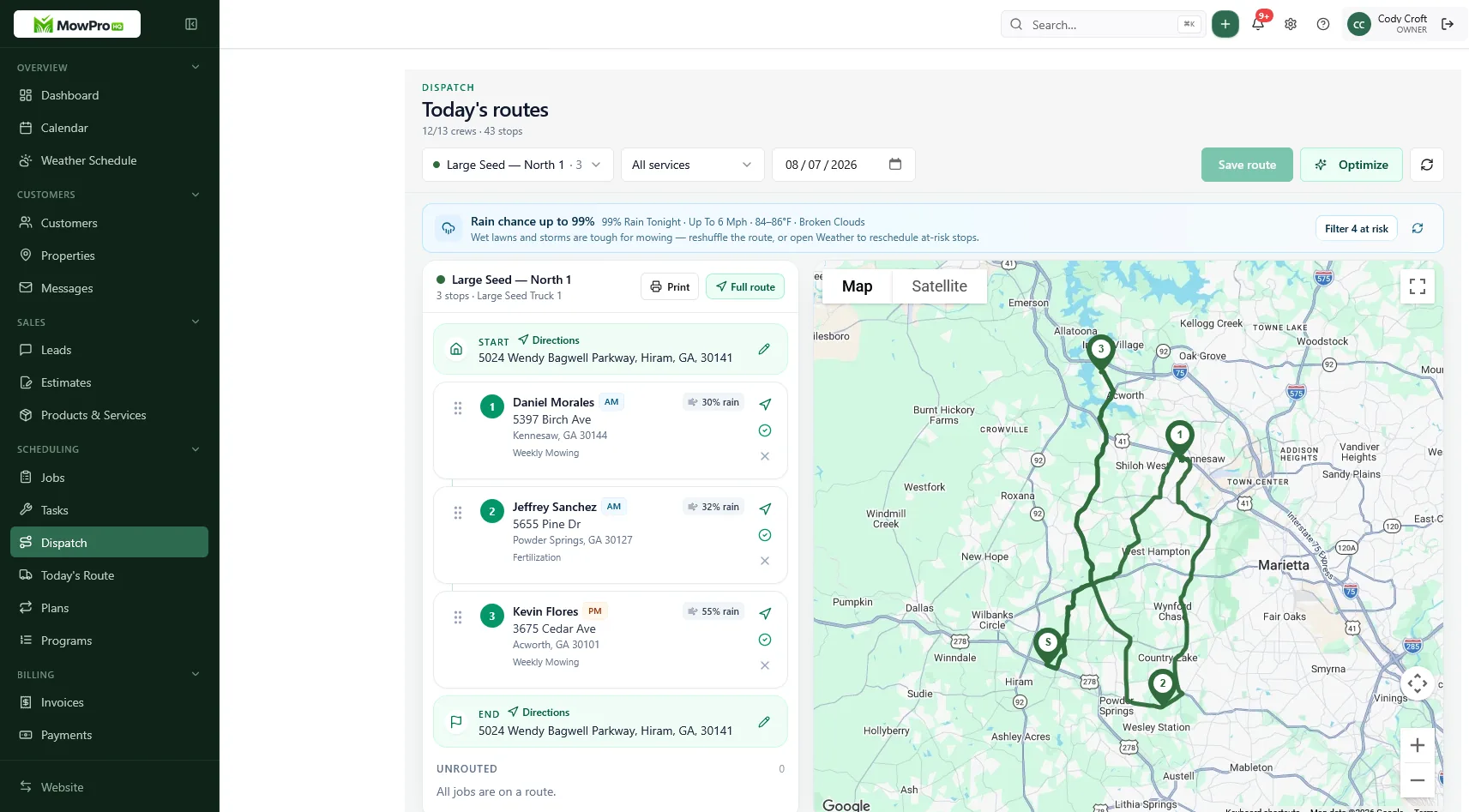
Where MowProHQ fits
MowProHQ combines scheduling with customer, property, quoting, and invoicing workflows for lawn care businesses. Compare its current capabilities and plan details on pricing, then use signup if it meets your operational, privacy, and security requirements.
Scheduling software cannot prevent rain, traffic, or equipment failure. It can provide a shared, reviewable plan for responding to them—if recurring rules, permissions, field habits, and data controls are configured carefully.
Frequently asked questions
- What is lawn care scheduling software?
- Lawn care scheduling software connects jobs, properties, crews, and service history in one calendar. It should handle recurring visits, weather changes, property notes, completion status, and mobile updates without forcing the office to maintain a second schedule.
- Can a solo lawn care operator use scheduling software?
- Yes. A solo operator may only need recurring jobs, property notes, a reliable mobile list, and a simple path from completed work to invoicing. More advanced dispatch and location tools generally matter when multiple crews share work.
- How is lawn care scheduling software different from a regular calendar?
- A regular calendar stores appointments. Lawn care scheduling software should also understand service frequency, assigned crews, properties, skipped visits, completion history, and what happens to future dates after a weather delay.
- What should happen to recurring jobs after a rain delay?
- The software should let an authorized user record the weather delay, move affected work into available capacity, preserve the reason for the change, and make the next recurring date clear. The business should decide whether the series stays on its original cadence or shifts with the delayed visit.
- Does lawn care scheduling software work offline?
- Some products cache schedules or allow limited offline updates, while others require a connection. Test the exact field workflow in a low-signal area and confirm how conflicts are handled when a device reconnects.
- What data should I export before choosing scheduling software?
- At minimum, confirm that you can export customers, properties, recurring service rules, scheduled and completed jobs, notes, time records, and invoice references in a usable format. Also ask how attachments and photos can be retrieved.